



Book writing software that gets out of your way.
A quiet page for the draft, and a studio one click to the side for everything else: your Source of Truth, a fiction-aware style check, notes, history, focus mode and sounds. It saves every keystroke, works offline, and follows you from desktop to phone to web.
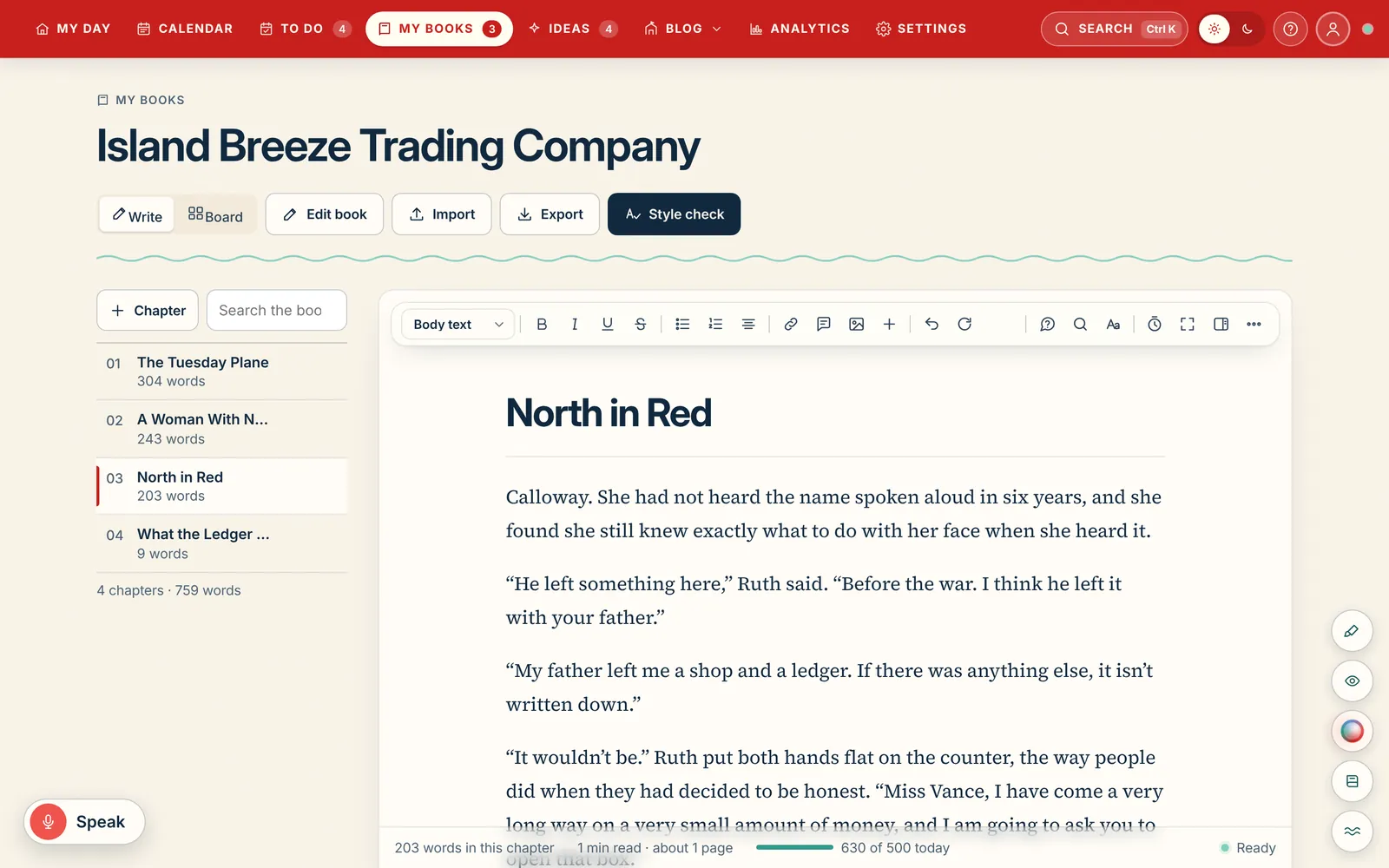
A page built for long books.
Chapters run down the left with their word counts, the manuscript sits in a calm serif in the middle, and a one-line status along the bottom tells you whether you're saved on this device or synced. That's the whole screen until you ask for more.
Select text for a small toolbar with the formatting you need. Drop photos straight into the manuscript, and they carry through to your Word export. Set the type, line spacing and page width the way you like to read.
Search the whole book from the chapter list, then use Fix everywhere to make one correction in every place it appears, with Undo.
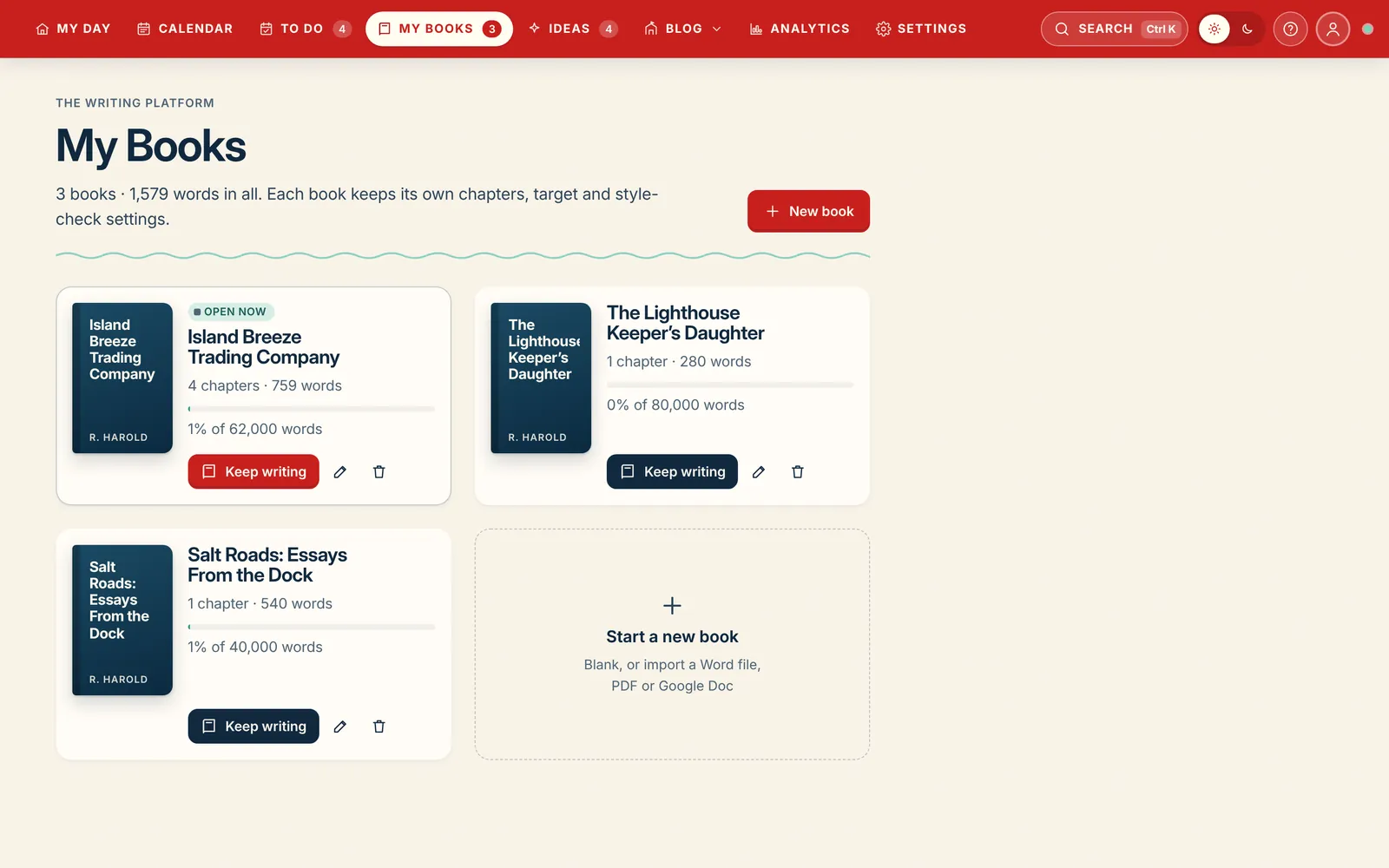
Several books, one shelf.
Keep every project in My Books: the novel, the sequel you've started, the essay collection. Each book has its own cover, word target, deadline and style-check rules, and opening one puts you back exactly where you left off.
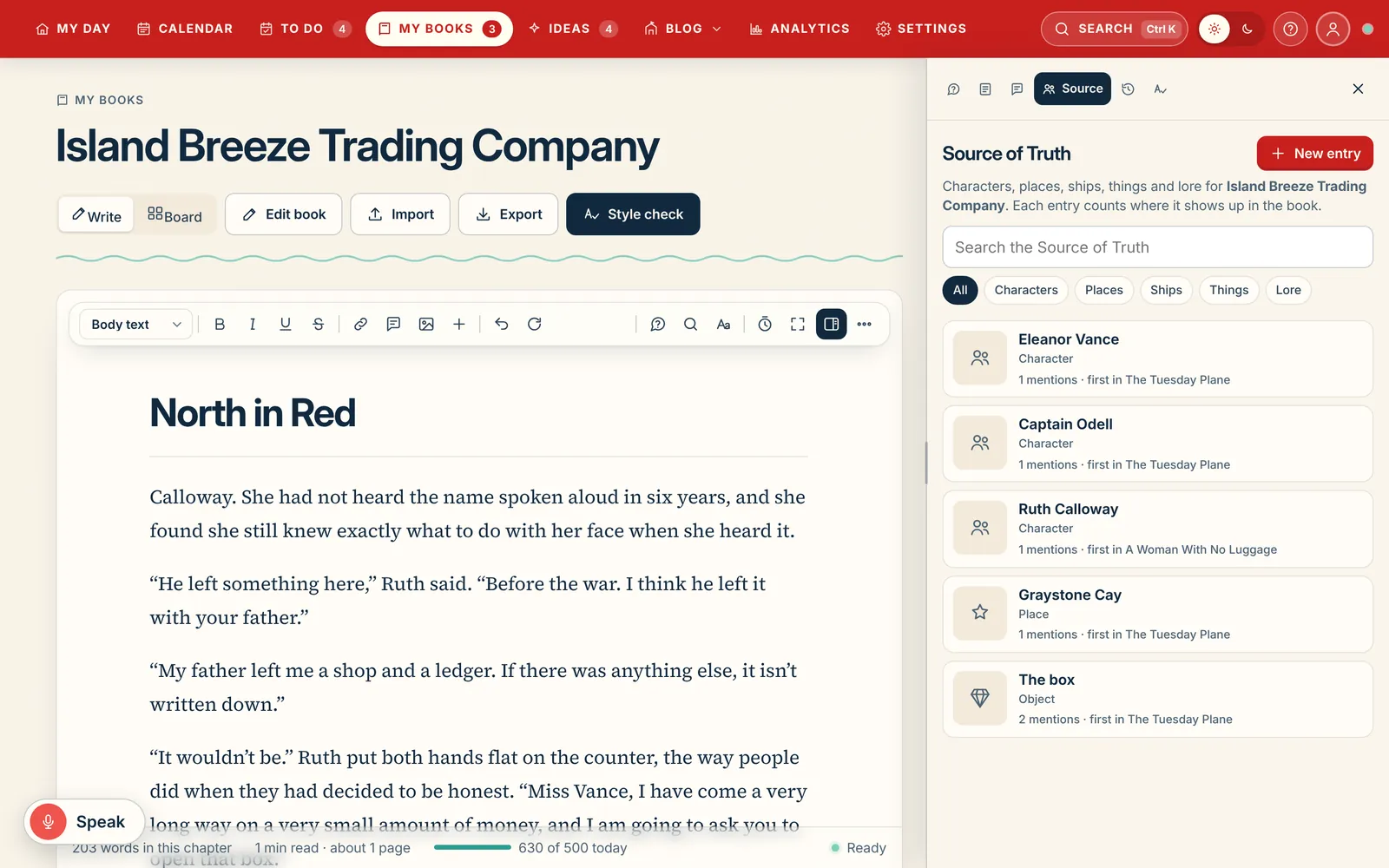
A Source of Truth that knows your book.
The Source of Truth holds your characters, places, ships, things and lore. Each entry counts how often it appears in the manuscript and where it first shows up, so you can check a scar, a surname or a ship's name in seconds.
Beside it in the Studio panel: chapter details with point of view and status, margin notes, and the full history of every chapter.
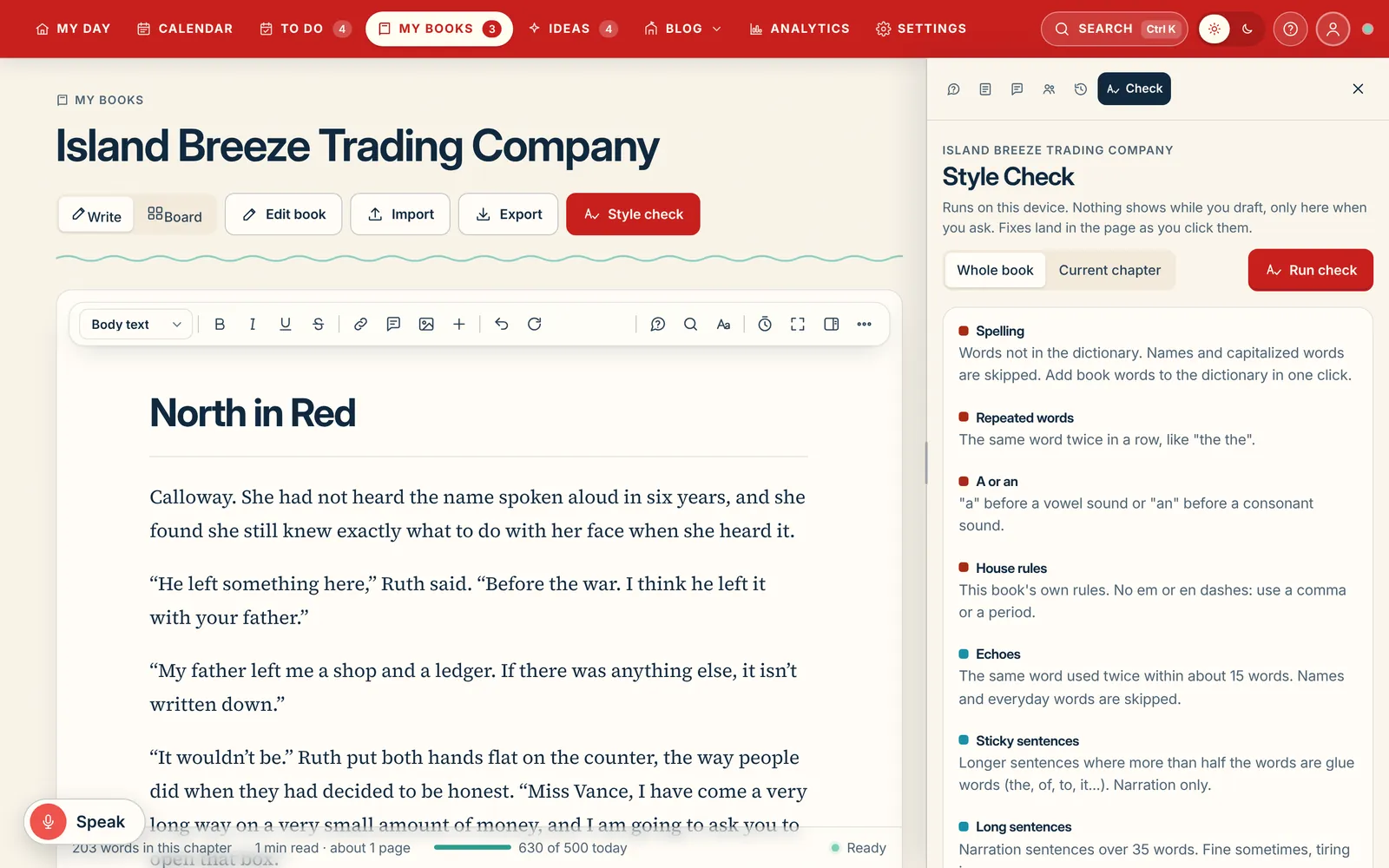
A style check that understands fiction.
Nothing gets underlined while you draft. When you ask, the style check reads the chapter or the whole book and groups what it finds: spelling, repeated words, a or an, echoes, sticky sentences, long sentences and your own house rules, such as no em dashes.
Fiction mode is on by default, so dialogue is allowed to be a fragment and a character can say "ain't". Add a name to the book's dictionary or silence a rule for the whole book in one click. It runs on your device, and it never changes a word on its own.
Focus mode
Disappear into the page.
One click and the menus, the chapter list and every panel fade away. What’s left is the page, your words, and a quiet count of how far you’ve come today. Put some music on, mix in the rain, and the hours go.
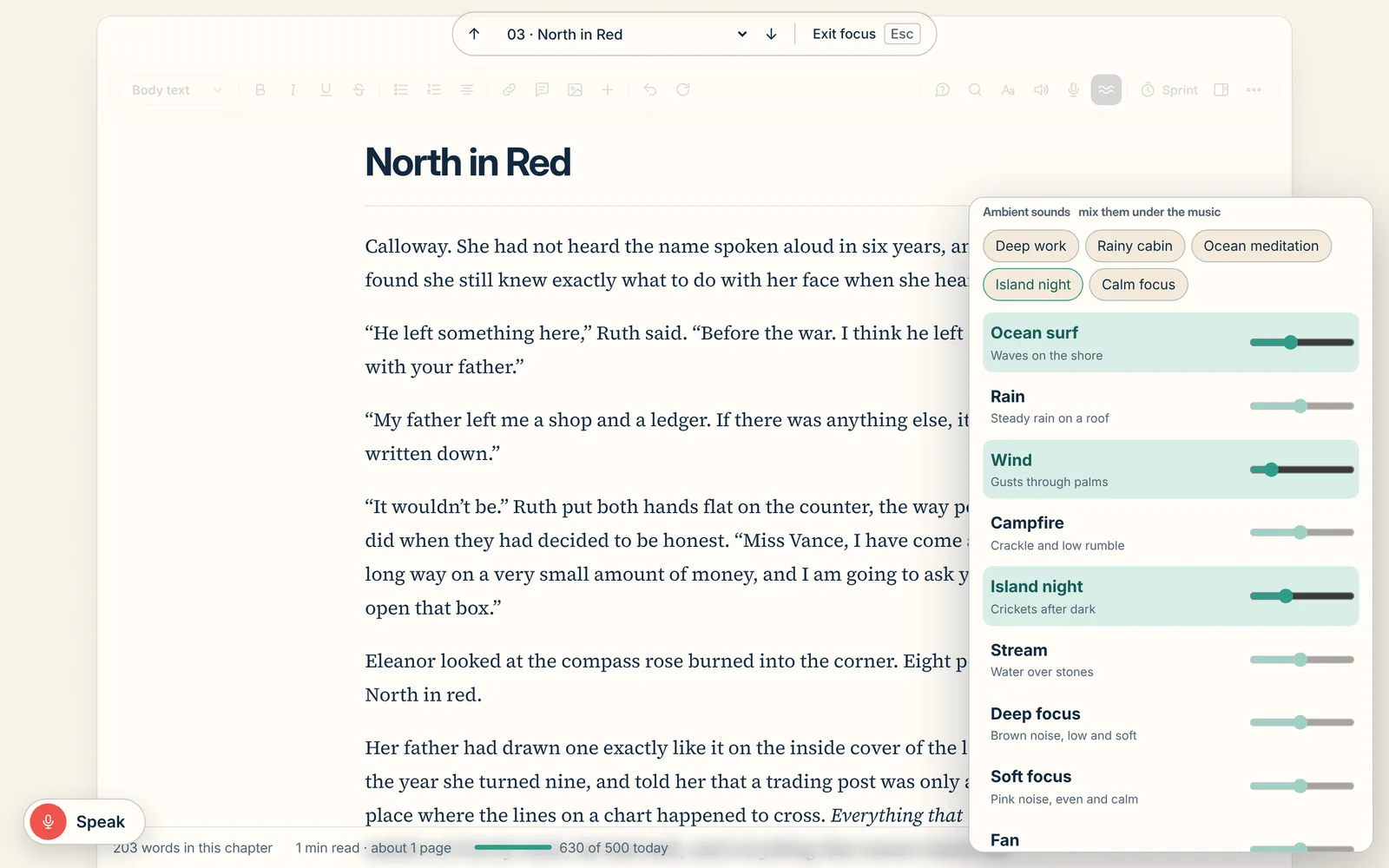
Everything else steps aside
The toolbar, the chapter list and every panel fade away. Just the page, in the type and width you chose.
Move through the book
A slim bar up top steps to the previous or next chapter (Alt Page Up, Alt Page Down) or jumps to any chapter, without leaving focus.
Sprints and today’s goal
Start a 15-minute sprint. Today’s words against your goal sit quietly along the bottom.
Speak when typing won’t come
Voice typing stays one tap away. Say "comma", "period" or "new line" as you go.
One obvious way out
Press Esc or Exit focus and you’re back exactly where you were.
By day or by night
A warm cream page by day, a deep navy page by night.
How a session goes.
- Open the chapter.Press Focus, or ⌘K and type "focus". The room goes quiet.
- Put on a track.19 tracks made for writing: Beach, City, Deep Ocean, Flow, Jazz, Upbeat and Winter.
- Mix in the room.Rain on the roof, a campfire, waves, crickets after dark. Each with its own volume, or a ready-made scene.
- Set the fade.Choose 15 minutes to an hour and a half. When the session ends, the sound fades out gently.
- Write.Nothing to click, nothing to check. Just the next sentence.
Sounds
Score your writing session.
Music on top, the room underneath. Pick a track, layer in any of thirteen ambient sounds with their own volume, or start from one of five scenes. Try them right here.
Scenes
Ambient sounds tap to add, slide to mix
Nothing playing yet.
The soundtrack
19 tracks made for writing, by mood
- 01Low Tide LedgerBeach3:28
- 02Sandbar SketchesBeach2:44
- 03Driftwood DeskBeach3:16
- 04Salt Air DraftBeach3:14
- 05Midtown MarginsCity3:06
- 06Night Train NotesCity3:08
- 07Rooftop RewritesCity3:09
- 08Neon TypewriterCity3:30
- 09Fathom LineDeep Ocean3:33
- 10Blue Hour BelowDeep Ocean3:04
- 11Kelp Forest PagesDeep Ocean3:23
- 12The Quiet TrenchDeep Ocean3:19
- 13Current DriftFlow3:23
- 14Following SeaFlow3:09
- 15Steady KeelFlow3:18
- 16Harbor Bar Blue NotesJazz3:08
- 17Brass on the PierJazz3:16
- 18Tradewind TempoUpbeat2:59
- 19Northern Lights LogWinter3:08
Shuffle or repeat. One track plays at a time, over your ambient mix, and keeps playing as you move around the app.
Made on your device
The ambient sounds are generated live by the app, so there’s nothing to download and they work offline.
Music over the room
One track at a time plays over your ambient mix, each with its own volume, plus a master volume for both.
Keeps playing
Move from the page to your notes, the calendar or the blog, and the sound carries on.
Fade-out timer
15, 25, 45, 60 or 90 minutes, then the sound fades away instead of stopping dead.
Controls on your phone
Play, pause and skip tracks from the lock screen or your keyboard’s media keys.
Binaural beats
Calm focus at 10 Hz and sharp focus at 16 Hz. Put headphones on for these.
A good morning, every morning.
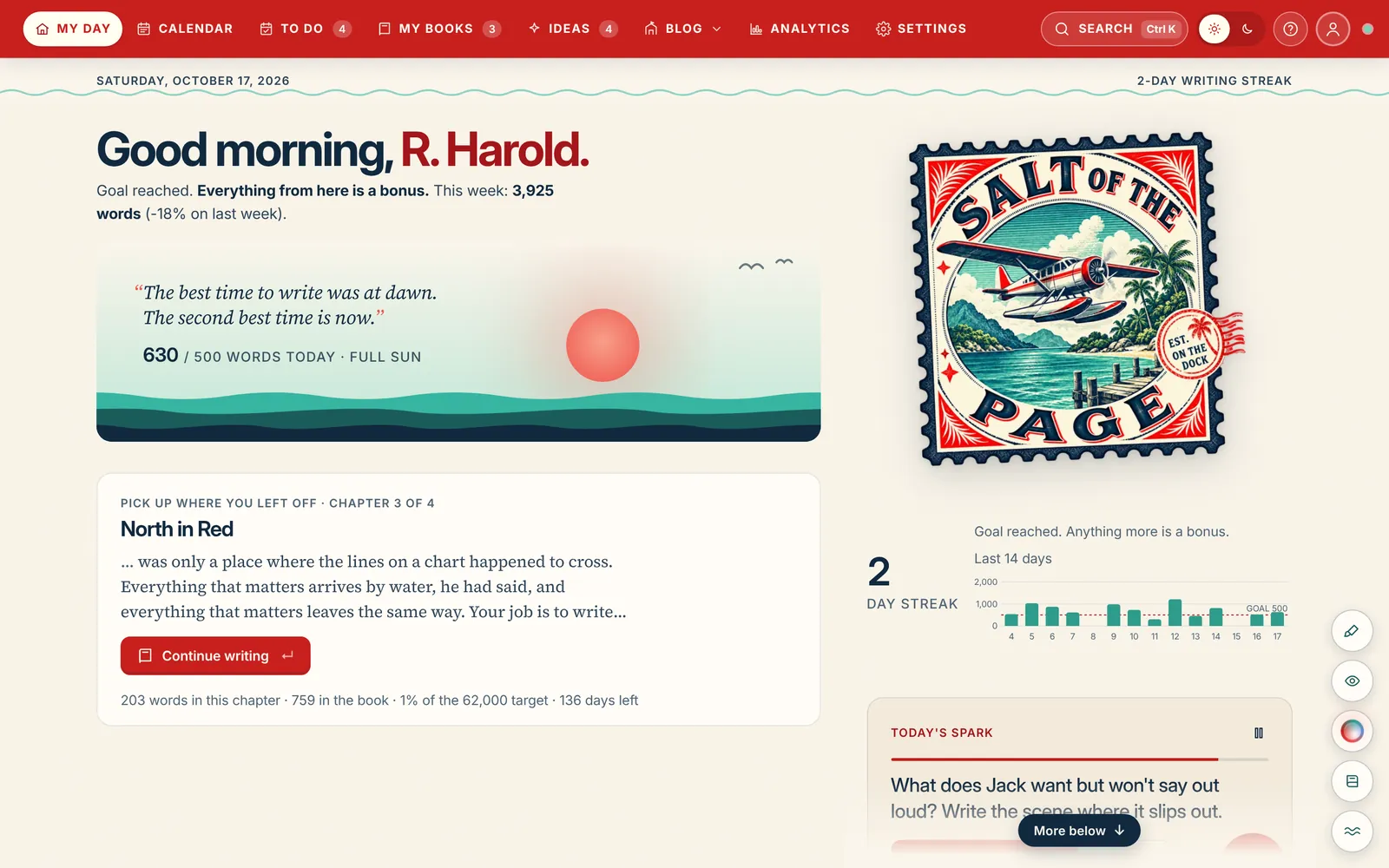
My Day greets you with today's words against your goal, a sunrise that fills as you write, your streak and a 14-day chart, the chapter you left off in, and one of about a hundred writing sparks to start from.
Writing with someone? Their words today and this week show on your My Day too.
Everything else in the room
The small things that make a long book easier.
Import anything
Word (.docx), Google Docs, PDF or pasted text. You see it split into chapters in a preview before anything is saved.
Voice typing
A big Speak button types where your cursor is. Say "comma", "period" or "new line". Works in every browser and the desktop app.
Read aloud
Hear a chapter read back to you to catch the clunky sentence your eyes keep skipping.
Spoken dictionary
Say or type a word for definitions, examples and clickable synonyms, then add it to spell check.
Ask the book
Ask "what colour are Ruth's eyes?" and get the answer from your own sentences, with links to the passage. On your device, no AI needed.
Board view
See every chapter as a card to rethink the order and the status of the draft.
Margin notes
Leave yourself notes against a chapter without cluttering the manuscript.
Command palette
Press ⌘K or Ctrl K to jump anywhere, start a sprint, import a file or change the theme.
Guided tours
Every page has a short tour that points at each part, offered once, there whenever you want it.
Light and dark
A warm cream page by day and a deep navy page by night, everywhere.
Two people, one book
Share a book with a co-writer or editor. Chapters merge piece by piece, so you never overwrite each other.
Every device
The desktop app on Mac, Windows and Linux, the phone app on iPhone and Android, and the web, all the same book.
Never lose a word
Writers lose whole chapters to bad syncs. We built against it.
Lost work is the most common complaint about writing apps. These are the rules Salt of the Page is built to.
Saved in two seconds
Every edit is written to your device within two seconds, then synced. A status line always says which.
Conflicts never overwrite
If two devices change the same chapter, the newer edit wins and the other is kept in that chapter's history.
History you can trust
Snapshots every ten minutes of writing and before every import or restore, kept for 90 days. Restore a chapter in two clicks.
Yours to take
Download everything at any time: Word, EPUB, Markdown, and a ZIP of the manuscript, notes, Source of Truth, posts and ideas.
Write the book you keep meaning to finish.
Everything above, on every device you own, for $150 once or $10 a month.